ECDIS
ECDIS replaces the paper chart as the primary means of navigation only when it runs official vector chart data (ENCs) with a valid backup arrangement a chart plotter running raster scans or a demo dataset is not ECDIS in the SOLAS sense, whatever the software calls itself.
What to check on an ECDIS.
19 models from Wärtsilä in ECDIS. Below: the full model list.
What makes a system ECDIS rather than a chart plotter
The term ECDIS is reserved, under IMO performance standards, for a system that displays official Electronic Navigational Charts (ENCs) vector data issued or authorised by a national hydrographic office and meets a defined set of functional requirements: continuous position plotting, route planning and monitoring with automatic grounding and danger alarms, and a documented backup arrangement in case the primary unit fails. A consumer-grade chart plotter or a system running raster scans of paper charts (RNC) instead of ENCs does not meet this standard, even if it looks similar on screen, because it lacks the alarm-generating vector data model that lets the system understand what a depth contour or a charted wreck actually means to the vessel's draft. Where ECDIS is the approved primary means of navigation, SOLAS still requires an independent backup either a second ECDIS unit or paper charts corrected to the same standard.
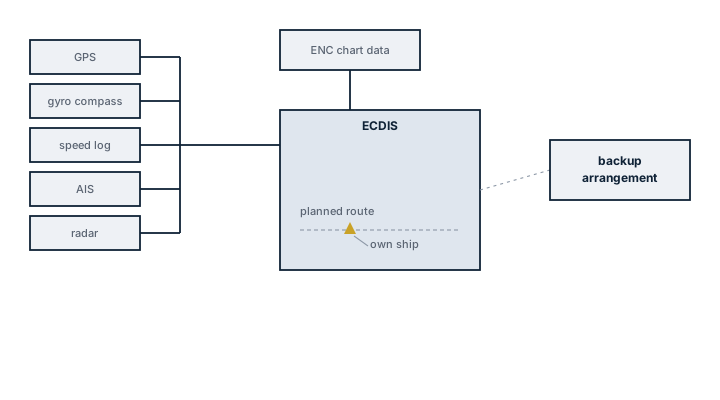
Legend
- GPS
- ENC chart data
- gyro compass
- ECDIS
- speed log
- AIS
- backup arrangement
- planned route
- radar
- own ship
Main components
ENC database and licensing
Vector chart cells covering the vessel's trading area, issued under licence and kept current through a chart correction service. An expired licence or an uncorrected cell is a navigational deficiency, not just an administrative one, since it means the displayed chart no longer reflects promulgated notices to mariners.
Sensor inputs
Position from GPS/GNSS, commonly dual-source for redundancy, heading from gyro or satellite compass, and speed from log, all feeding the display so the vessel's position and predicted track update in real time against the chart.
Read the full guide
Route planning and monitoring module
Lets the navigator lay a route with waypoints, cross-track limits and safety contour settings, then continuously checks the vessel's actual and predicted position against charted hazards, generating an alarm ahead of a grounding risk rather than after the fact.
Backup arrangement
A second, independently powered ECDIS unit or a full folio of corrected paper charts, arranged so a single failure power, software or hardware does not leave the bridge without a means of safe navigation.
Selection and sizing
- Type approval to the current IMO performance standard and IHO presentation library edition, since older approvals can lag behind chart data updates.
- Chart service coverage for the vessel's actual trading pattern, not just a demonstration region.
- Sensor integration compatibility with the bridge's existing gyro, GPS and AIS, including redundant position sources for the required cross-check.
- Screen size and bridge layout suitability for the required minimum display area under the performance standard.
Regulations and class
SOLAS Chapter V mandates ECDIS carriage on a phased schedule by ship type and tonnage, with paper charts remaining an acceptable backup where the vessel does not carry a second ECDIS. IMO's ECDIS performance standard and the associated IHO S-52 presentation library and S-57/S-101 data standards govern how chart data must be displayed and updated. Flag state and class both expect documented generic and type-specific ECDIS familiarisation training for watchkeeping officers under the STCW Manila amendments, checked at survey and during port state control inspections alongside chart currency.
Typical faults
| Fault | Cause | Consequence |
|---|---|---|
| Outdated chart data displayed | Correction service lapsed or updates not loaded | Charted hazards or navigational warnings missing from the display |
| Position offset from GPS | Datum mismatch between GPS and chart, or antenna offset not configured | Displayed position does not match actual position, false confidence near hazards |
| Grounding alarm not triggering | Safety contour or safety depth set incorrectly for the vessel's draft | No warning before entering shallow water |
| System freeze or reboot at sea | Software fault or overloaded processor from excessive chart layers | Loss of primary navigation display, must revert to backup |
What to look for in a supplier
- Current type approval certificate matching the software version actually installed.
- A chart correction and licensing service with proven coverage in the vessel's operating regions.
- Training documentation that meets the type-specific familiarisation requirement for the exact model installed.
- Clear upgrade path as IHO data standards and IMO performance standards revise, since chart formats have changed before and will again.
Check the safety contour setting against the vessel's actual draft every time a new route is planned, not just once at commissioning a safety contour left at a default value gives grounding alarms that mean nothing for the ship's real underkeel clearance.
Models in this type.
The best-documented model of each manufacturer first, then the next — 19 of 19 models in ECDIS. Every row links to full specifications, documents and service notes.
Manufacturers.
All 49 manufacturers with models of ECDIS. Names with a manufacturer page open it; the others open a search across the full library.
All manufacturersAlso in Radar & ECDIS.
The other equipment types in this category.
One request. A person reads it and replies by e-mail.
Tell us the manufacturer, the model and what you need — a part, a service call, a second opinion. A person reads every request and replies by e-mail.
No details at hand? A photo of the rating plate or the part is enough — simply attach it to the request.
Three things people ask first.
Is ECDIS data free?
Yes. Every model page, every guide and every datasheet for this type is readable without an account. An account adds saved searches and requests, nothing is taken away.
My model is missing — what now?
Send us the nameplate. We identify it by hand, add it to the library, and if you need a part or a service, the request is already on our desk.
Can you source a ECDIS part?
Yes. Tell us the manufacturer, the model and what you need — a person reads every request and replies by e-mail.